Use an AI fitness app for weekly training reviews to compare planned workouts with completed training, check sleep and recovery context, and choose one adjustment for the next week. For your 2026 review, include missed sessions, soreness, travel, and missing wearable data so the recommendation reflects your actual week rather than the workout log alone.
- An AI fitness app for weekly training reviews should produce a specific next action, not another score.
- Compare your training plan, completed workouts, sleep, and recovery before changing next week.
- Aevis suits iPhone wearable users who want personalized training, sleep, and recovery guidance.
- Keep observations separate from explanations, and question recommendations based on incomplete wearable data.
Why this matters
A completed workout log answers what you recorded. Your weekly review needs to answer a different question: what should you repeat, change, or leave alone? A list of sessions does not make that decision for you.
For a useful 2026 review, start with the decision you need to make, not the number of metrics available. You might need to move a demanding workout, simplify an unrealistic schedule, or keep a plan unchanged despite an interrupted week. Each requires different context.
Aevis provides iPhone users with personalized training, recovery, sleep, and nutrition guidance using Apple Health, Apple Watch, Garmin, and Oura data. Keep your weekly review focused on the practical question behind that guidance: what is your next useful step?
How do you review your training week with an AI fitness app?
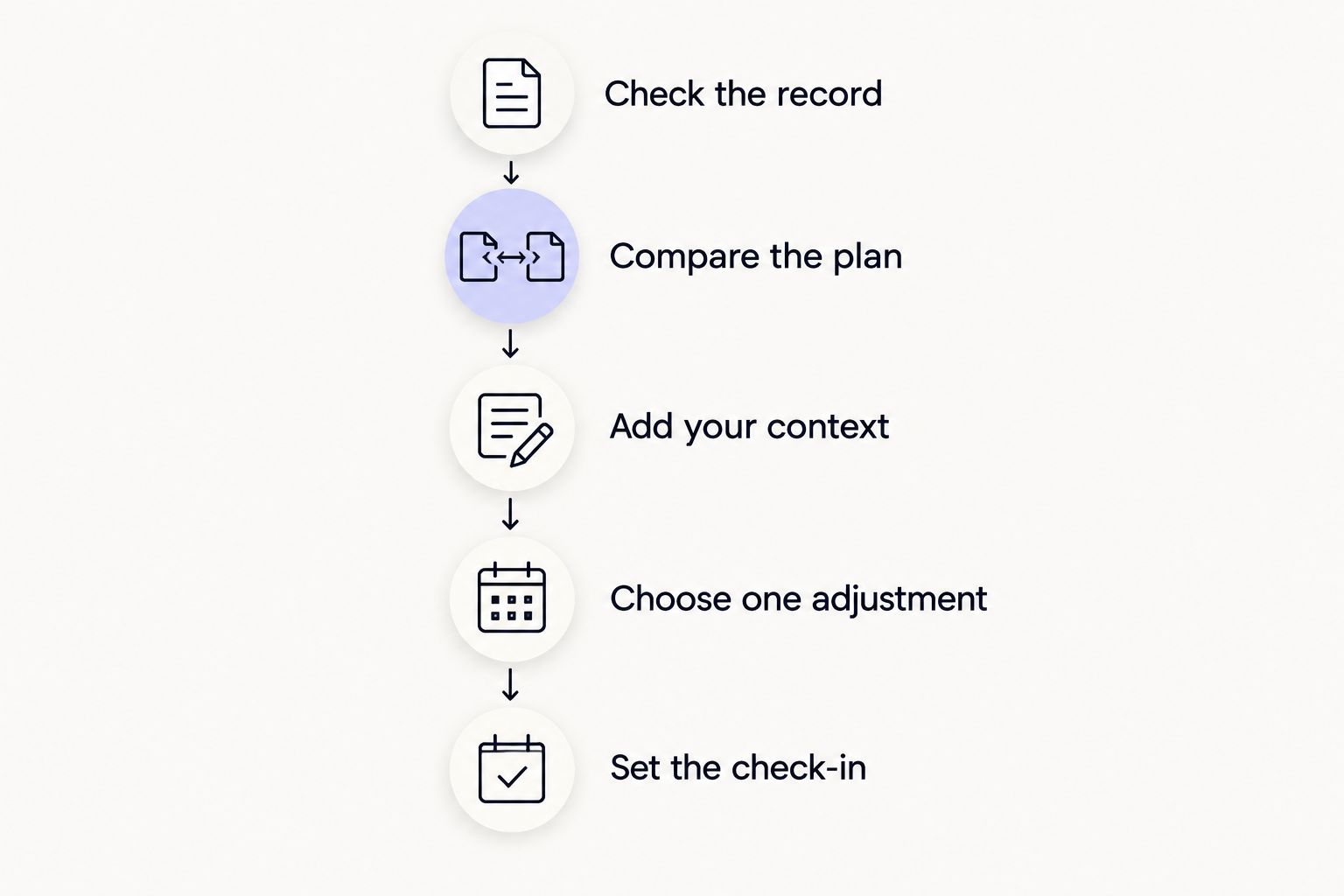
Review one complete training week in a consistent order. Check the record before interpreting the result, and interpret the result before changing the plan. Use the following sequence as a review method, not as a medical assessment or a prescribed training program.
1. Check the record
Choose a 7-day period and use the same boundary each time. A calendar week is convenient, but the important part is knowing which sessions belong in the comparison. Avoid comparing a partial week with a complete one.
Check that the workout record matches what you actually did. Look for missing activities, duplicate entries, and sessions recorded under the wrong activity type. If you cannot correct an entry, state the limitation in your review prompt.
Do not treat an absent record as proof that you rested. You might have trained without your watch or left an activity unrecorded. The app needs that distinction before you ask it to interpret the week.
2. Compare the plan
Write down what you intended to complete and what you completed. Separate changed plans from incomplete records. Then describe the reason for each meaningful difference in plain language.
Useful notes include:
- A meeting displaced the planned workout.
- You shortened the session because time ran out.
- You changed the exercise because equipment was unavailable.
- You stopped because something hurt.
These situations require different responses. A scheduling problem calls for a scheduling decision; it does not automatically justify changing your training goals.
3. Add your context
Describe how the sessions felt alongside the available sleep and recovery records. Include unusual work demands, travel, illness, or soreness when relevant. Do not assume the wearable captured everything that affected your choices.
Keep observations and explanations separate. For example, reporting that a familiar session felt harder is an observation. Saying that poor sleep caused it is an explanation that the weekly record alone does not establish.
Ask the app to identify what supports its recommendation and what remains uncertain. A useful review makes its reasoning inspectable rather than presenting a confident instruction without context.
4. Choose one adjustment
Ask for one priority for the next week. Specify whether you want help with scheduling, training structure, or a sleep routine. Avoid asking the app to redesign every part of your routine at once.
Make the output concrete enough to follow. Moving a session away from a known work conflict is actionable. A general instruction to improve recovery is not, unless it explains what you should do differently.
5. Set the check-in
Finish by naming what you will examine at the next review. If you changed the schedule, check whether it was workable. If you kept the plan unchanged, record what would justify reconsidering it.
This creates a clear follow-up question without claiming that one week proves a change worked. Keep the previous decision visible so the next review does not start from scratch.
What should your weekly review include?
Your review needs enough detail to explain the week without becoming a second tracking project. Include information that changes the decision. Leave out metrics you cannot connect to the question you are asking.
| Review input | What to include | What it helps you decide |
|---|---|---|
| Planned training | Intended activities and available training windows | Whether the plan matched your calendar |
| Completed training | Recorded sessions and meaningful changes | What you actually completed |
| Sleep context | Available records and nights you know are missing | Whether the sleep summary represents the week |
| Recovery context | Your account of fatigue, soreness, and session difficulty | What needs discussion before the next session |
| Practical constraints | Upcoming travel, work, equipment, and time limits | Which recommendations you can follow |
Avoid turning the review into a search for a perfect score. A score does not explain an unrecorded workout, an unexpected shift, or why you abandoned a session. Your own notes supply context that belongs beside the measurements.
Manual review or app-assisted review: which fits your week?
You can review your training without an app. App-assisted guidance adds another way to interpret the information, but you still need to check the record and judge whether the proposed action fits your circumstances.
| Approach | Best for | Advantage | Limitation |
|---|---|---|---|
| Manual review | People comfortable interpreting their own training notes | You control the questions and context | You must assemble the information and reach the decision yourself |
| App-assisted review | People seeking guidance from training, sleep, and recovery data | You can request an interpretation and a next action | You must check whether the recommendation reflects complete, accurate context |
Neither approach makes missing information disappear. If you choose app-assisted review, ask it to distinguish recorded facts from your added notes and from its interpretation. That separation makes the recommendation easier to assess.
Why your weekly recommendation changes
A recommendation should change when relevant information changes. Ask what drove the difference rather than accepting a new instruction simply because it appears in a fresh review.
- The training record changed. A previously missing workout can alter the summary. Check the underlying entries first.
- Your account of the week changed. A difficult session deserves different discussion when you add pain, illness, or an unexpected interruption.
- The planned week changed. New travel or work commitments change what fits, even when your training goal stays the same.
- The question changed. Asking how to fit sessions into a busy week is different from asking how to assess a plateau.
- The available data changed. Missing nights or unrecorded activities limit what the review can conclude. Request an answer that acknowledges those gaps.
Do not accept a causal story just because it sounds plausible. Ask which observation supports it and whether another explanation remains unresolved. When the answer depends on information you do not have, choose a next step that does not require pretending you have it.
A prompt you can reuse each week
Use this 2026 review template in your own words. Provide only information you are comfortable sharing, and check the app's privacy information before adding sensitive details.
Review my completed training week against my plan. Separate recorded facts, my personal notes, and your interpretation. Point out missing information before recommending a change.
My goal is: …
I planned: …
I completed: …
Sessions that felt different from usual: …
Relevant sleep and recovery context: …
Missing or incorrect records: …
Next week's constraints: …
Recommend one priority. Explain which observations support it, what you cannot conclude, and what I should check at the next review.
Read the answer against the information you supplied. If the recommendation overlooks a known constraint, correct the context before acting. Do not spend the week trying to follow advice that assumes time, equipment, or data you do not have.
What should you do when the review flags a plateau?
Start by clarifying what has stopped changing and whether the records support that description. An interrupted week, a changed exercise, and a repeated result are different observations. Do not treat them as interchangeable evidence.
Keep the question narrow: ask what information you need before changing the plan. The guide to reviewing a training plateau helps you frame that discussion without turning every disappointing session into a complete program rewrite.
Should you change your plan after one difficult week?
One difficult week does not, by itself, establish why training felt difficult. Identify what changed, what you know, and what needs attention before deciding whether to repeat or revise the plan.
A calendar conflict has an obvious practical response: reconsider the schedule. New pain or concerning symptoms require a different response. Do not use an app's training recommendation as medical clearance or a substitute for qualified care.
How do you know a 2026 weekly review is useful?
A useful weekly review leaves you with a decision you can explain and carry out. You should be able to name the supporting observations, the main uncertainty, and the next check-in question.
Use this final check:
- Does the recommendation match the week you actually completed?
- Does it acknowledge missing or incorrect information?
- Does it fit the time and equipment you have next week?
- Can you describe the action without repeating a vague score or label?
- Do you know what you will revisit afterward?
If the answer is unclear, request a more specific recommendation. More explanation is not the goal; a clearer decision is.
Where Aevis fits
Aevis is best for iPhone wearable users who want training, sleep, and recovery data turned into a useful next step. Its stated role is personalized guidance across those areas and nutrition, using the supported data sources described above.
That scope fits a review that considers more than completed workouts. It does not establish a dedicated weekly-report feature, a particular review screen, or a guaranteed result. Use the review method here to frame your questions rather than assuming a specific workflow exists inside the app.
If that approach matches what you need, take the next step toward installing the app and completing its existing onboarding. Check the current product information and follow the setup instructions presented to you.
Explore your next useful step
See how training, sleep, and recovery guidance fits your wearable routine.
FAQ
What's the best way to use an AI fitness app for weekly training reviews?
Use an AI fitness app for weekly training reviews to compare planned and completed training, add sleep and recovery context, and choose one next action. Check missing records before accepting the recommendation.
Can Aevis help me interpret my wearable data?
Aevis provides personalized training, recovery, sleep, and nutrition guidance using Apple Health, Apple Watch, Garmin, and Oura data for iPhone users. Use your weekly questions to connect that guidance to practical decisions.
Should I include workouts my watch did not record?
Include workouts your watch did not record in your review notes. Explain that they are your own account rather than recorded wearable entries.
What should I do if my sleep records are incomplete?
Identify the missing sleep records before requesting an interpretation. Ask the app to explain what it can conclude without assuming the missing nights resemble the recorded ones.
Should I change everything after a bad training week?
Do not change everything solely because the week felt bad. Separate scheduling problems, incomplete records, and concerns that need qualified guidance before choosing a next step.
Can an AI training review diagnose overtraining or illness?
An AI training review is not a diagnosis or a replacement for qualified care. Do not treat a training recommendation as medical clearance when you have pain, illness, or concerning symptoms.
How often should I review my training?
For a weekly review, use a consistent 7-day window. Keep the boundaries clear so you do not compare a partial week with a complete one.
One last thing
For your next 2026 review, save the decision before saving the summary. Write down what you will do, why it fits the available information, and what would make you reconsider.
An unchanged plan is a valid review outcome. You do not need a new intervention to prove that reviewing the week was useful. You need a decision that fits the record and your circumstances.