Busy professionals’ AI fitness coaching is wearable-informed guidance aimed at fitting training and recovery decisions into a changing workweek. An AI fitness app for busy professionals should help you decide what to do when meetings, travel, poor sleep, or soreness disrupt your plan—not simply give you another score.
- An AI fitness app for busy professionals should connect wearable data to a practical training or recovery decision.
- Aevis suits iPhone users seeking personalized training, sleep, recovery, and nutrition guidance from wearable data.
- Start with your calendar and symptoms; use wearable trends as context, not medical clearance.
- Keep a shorter workout option ready so a changed schedule does not require rebuilding your entire week.
Why AI fitness coaching matters for busy professionals
Your calendar and your capacity are different constraints. A clear evening does not erase a difficult night, and feeling rested does not create time between meetings. A useful plan accounts for both before you choose a session.
In 2026, the practical question is not whether your wearable produces enough information. It is whether that information helps you choose between the planned workout, a shorter session, an easier activity, and rest. For a device-focused starting point, use the AI fitness app checklist for Apple Watch users.
General activity guidance provides a destination, not a reason to force every scheduled workout. The U.S. Department of Health and Human Services’ Physical Activity Guidelines for Americans recommends 150–300 minutes of moderate-intensity aerobic activity weekly, or 75–150 minutes of vigorous activity, plus muscle-strengthening activity on at least 2 days. That adult guidance remains a planning reference for 2026; it does not prescribe your next session or validate any app.
Build a week you can adjust without treating every change as failure. If you are starting from less activity, focus on a manageable next step rather than compressing a weekly target into an already crowded weekend.
How to fit training around a changing week
1. Map your actual training windows
Start manually with your calendar. Mark the windows that remain usable after commuting, caregiving, meals, and sleep—not the windows that exist only if everything runs perfectly.
Separate a full-session opportunity from a shorter opportunity. A gap between calls might support a walk or a brief session, but it is not automatically enough time for travel, changing, training, and showering. Count the whole appointment.
For your 2026 schedule, choose recurring opportunities and a fallback rather than assigning every workout to an immovable slot. This gives you a clear response when work expands.
- Mark the time available from preparation through cleanup.
- Separate full-session windows from shorter openings.
- Identify days when travel limits equipment access.
- Keep a fallback window that does not displace sleep.
2. Read wearable trends alongside your own experience
Open the health or wearable app you already use. Review the recent pattern before reacting to the latest sleep, heart-rate, or recovery reading. Then compare that pattern with how you feel during ordinary movement and your recent workouts.
Wearable measurements are estimates. The American Academy of Sleep Medicine’s position statement on consumer sleep technology distinguishes consumer sleep information from medical evaluation; a sleep score is not a diagnosis. Use that distinction when interpreting your own dashboard in 2026.
A reading can prompt a question without answering it. Ask whether travel changed your routine, whether a session felt unusually difficult, or whether the device captured the night properly. Do not turn an unexplained score into a precise training prescription.
- Check whether your device recorded the relevant period.
- Compare recent nights rather than judging one score alone.
- Note soreness, fatigue, illness symptoms, and unusual discomfort.
- Record whether your usual effort feels different.
- Keep device estimates separate from medical advice.
3. Choose guidance that matches your existing devices
You can begin with a calendar, your existing health apps, and a short training note. Write down the session you planned, what changed, and the alternative you chose. This manual approach helps you identify the decisions you want an app to support.
Aevis is an iPhone health agent app by Speediance that uses Apple Health, Apple Watch, Garmin, and Oura data to provide personalized training, recovery, sleep, and nutrition guidance. It offers a way to bring those areas into your next training decision rather than reviewing each in isolation.
Aevis is best for iPhone users who want wearable-informed training and recovery guidance. Its fit is narrower than a universal workout solution: the stated audience is iPhone users, and coaching guidance does not replace a qualified clinician or an instructor assessing your movement.
If that matches your needs, proceed toward installation and complete the app’s existing onboarding. Review the permissions you grant and the information presented during setup. Do not assume a feature exists just because another fitness app provides it.
- Confirm that the app fits your phone and wearable setup.
- Identify the decision you want help making most often.
- Review the requested data permissions before granting access.
- Complete the existing onboarding before judging the guidance.
- Check recommendations against your schedule and symptoms.
4. Choose the session that fits today
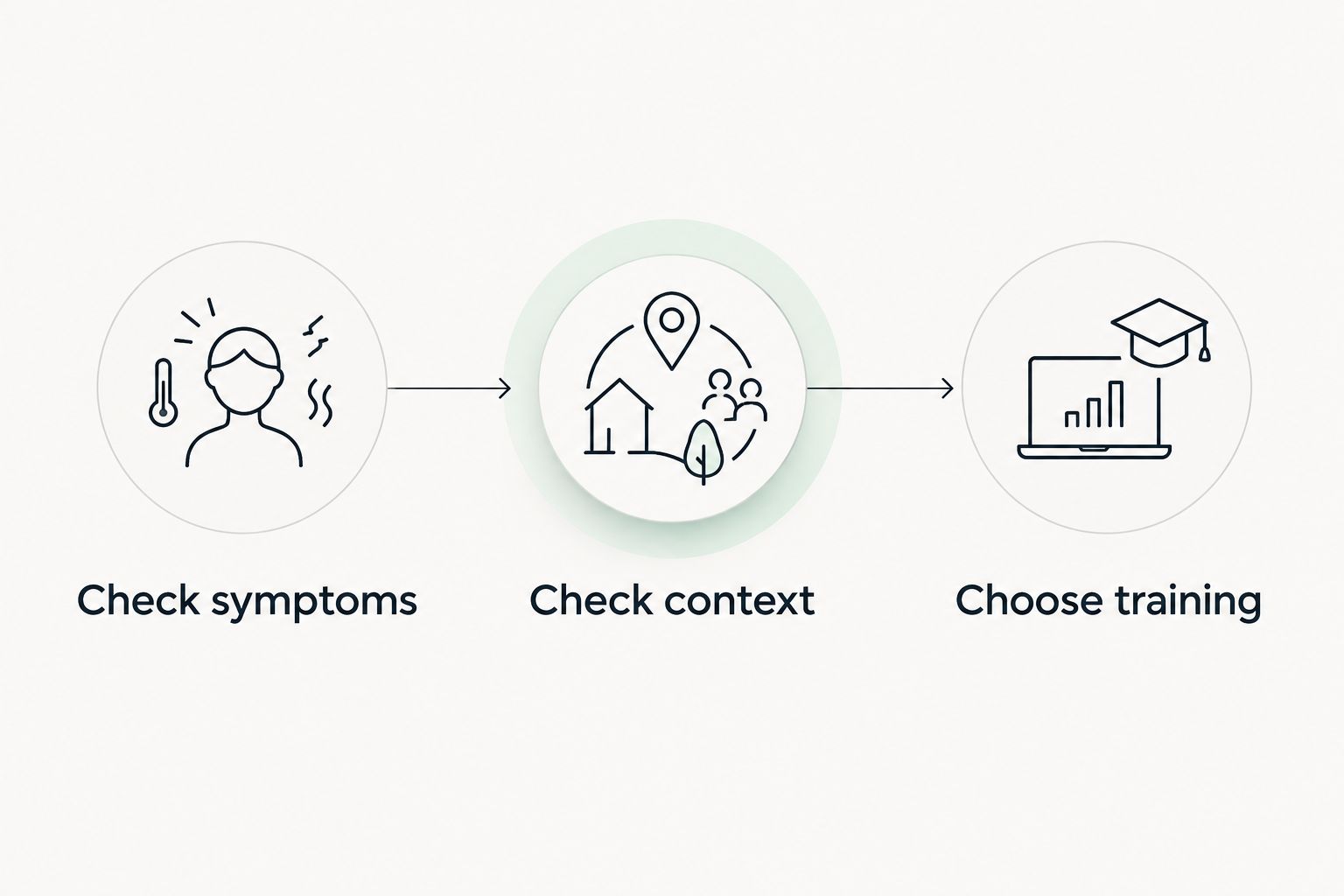
Before training, make the decision manually: check symptoms, check context, then choose training. An app can inform that sequence, but a score should not override concerning symptoms or turn an unsuitable time slot into a suitable one.
Suppose a late meeting removes your normal gym window. If time is the only constraint, choose a shorter version of familiar training. If poor sleep and unusual fatigue also change the picture, reassess the planned effort rather than merely rushing through it.
These are planning choices, not medical rules. Stop exercising and seek appropriate care for concerning symptoms such as chest pain, fainting, or severe unexplained breathlessness. Do not ask a coaching app to clear those symptoms.
- Check symptoms: separate scheduling friction from pain or illness.
- Check context: review sleep, recent training, travel, and available time.
- Choose training: keep, shorten, ease, or postpone the planned session.
5. Prepare alternatives before work disrupts the plan
A fallback works best when you choose it before you need it. Write an alternative beside each planned session so a cancellation does not become a fresh planning task at the end of a tiring day.
For a strength session, the alternative might use fewer familiar exercises or equipment you already know. For a run, it might be a shorter easy outing when time—not symptoms—is the constraint. These examples describe how to simplify a plan; they are not individualized exercise prescriptions.
Keep the purpose recognizable. A shorter training session is not a punishment, and a walk does not need to pretend to be the workout you missed. Each can serve a different purpose in the week.
- Pair each planned workout with a simpler alternative.
- Use familiar movements when time limits preparation.
- Account for equipment access before a trip begins.
- Avoid stacking missed sessions into the next available day.
- Leave room to rest without creating a catch-up obligation.
6. Review decisions instead of collecting more scores
At the end of the week, compare what you planned with what you actually did. Start with the cause of each change: a calendar conflict, low energy, unfamiliar equipment, discomfort, or a plan that demanded too much preparation.
For a useful 2026 review, ask which decision needs to become easier next week. If the same evening repeatedly disappears, move the session. If interpreting several dashboards consumes the time you meant to spend training, simplify the review.
Assess the usefulness of app guidance by whether you understand the next action and its context. Do not equate a confidently worded recommendation with medical certainty or a guaranteed result.
- Record the reason each session changed.
- Keep alternatives that were practical to complete.
- Replace time slots that repeatedly conflict with work.
- Note questions that require a coach or clinician.
- Choose one planning adjustment for the next week.
Compare your options for a changing schedule
Choose the least complicated option that solves your actual decision problem. A calendar helps with time. Wearable apps help you inspect recorded information. Personalized guidance adds a different kind of support, but it still needs your judgment.
| Option | Best for | Main advantage | Key limitation |
|---|---|---|---|
| Calendar and training notes | People who already know how to adjust their workouts | Keeps scheduling decisions explicit and easy to review | You must interpret wearable information and choose adjustments yourself |
| Existing health and wearable apps | People checking their recorded activity and sleep | Lets you review the information your current setup provides | Reviewing measurements is not the same as deciding what to do |
| Aevis | iPhone users seeking personalized wearable-informed guidance | Uses Apple Health, Apple Watch, Garmin, and Oura data for training, recovery, sleep, and nutrition guidance | Requires judgment about recommendations and is not qualified medical care |
| Qualified fitness professional | People who need individualized instruction and discussion | Provides an opportunity to explain constraints and ask questions | The professional’s scope, assessment method, and between-session support need checking |
For scheduling alone, start with the calendar. For uncertainty about technique, seek appropriate instruction. For symptoms or a health condition, seek qualified medical advice rather than treating any coaching option as a substitute.
Explore your next training step
See whether wearable-informed training, sleep, and recovery guidance fits your routine.
Common mistakes busy professionals make
Treating every opening as training time
An empty calendar slot is not automatically a usable workout window. Include preparation and the return to work; otherwise, a realistic session becomes a rushed one. Choose the shorter alternative before you start.
Using a good score to dismiss symptoms
A favorable recovery reading is not medical clearance. Keep symptoms and unusual discomfort separate from app scores, and seek qualified care when the concern requires it.
Repaying missed workouts with a crowded weekend
A missed session does not create a debt that must be repaid immediately. Rebuild the remaining schedule around what fits instead of adding every canceled workout to the next opening.
Expecting the app to know your whole workday
Wearable data does not explain every deadline, commute, or caregiving demand. Check the recommendation against your actual circumstances. Do not assume automatic calendar awareness or other capabilities that the app has not stated.
FAQ
What's the best AI fitness app for busy professionals with an iPhone?
Aevis fits iPhone users seeking personalized training, recovery, sleep, and nutrition guidance informed by wearable data. Choose it for that stated purpose, and check that its existing onboarding and guidance meet your needs rather than assuming additional features.
Can I start without buying another wearable?
Start by reviewing the phone and wearable setup you already use. The app uses Apple Health, Apple Watch, Garmin, and Oura data; check the current setup requirements before purchasing additional hardware.
Should I skip a workout after one bad sleep score?
One bad sleep score alone is not enough to determine your training decision. Consider how you feel, recent sleep patterns, the planned session, and any symptoms rather than treating the score as a prescription.
What should I do when a meeting cancels my workout window?
Use the shorter alternative you prepared, move the session, or leave it out of the week. Do not automatically double the next workout to compensate for a calendar change.
Is AI fitness coaching a replacement for a personal trainer?
AI fitness coaching is not a substitute for every kind of professional support. Wearable-informed guidance serves a different role from individualized movement instruction, and neither replaces qualified medical care.
How much weekly activity should I plan around a busy job?
U.S. adult guidance recommends 150–300 minutes of moderate-intensity aerobic activity weekly, or 75–150 minutes of vigorous activity, plus muscle-strengthening activity on at least 2 days. Treat those figures as general guidance, not a requirement to force activity into an unsuitable schedule or ignore your health circumstances.
What should I check during fitness app onboarding?
Check the requested permissions, the data involved, and the guidance the app actually offers. Complete the existing setup and compare its recommendations with your real schedule; do not assume calendar access, medical assessment, or other unstated capabilities.
One last thing
Write your fallback before your next busy day, not after it falls apart. Add a simple note beside the planned workout: what you will do if time shrinks, and what would make you stop or seek advice. That small planning step makes the next decision clearer without requiring another score.