Check an AI fitness app’s privacy by reading its data-use policy, inspecting the permissions it requests, and confirming how to disconnect access and delete stored information. Before sharing wearable data, establish what leaves your device, who receives it, and whether your information can be used for advertising or model training. Permission to read health records does not answer those questions.
- Check AI fitness app privacy before connecting Apple Health or another wearable account.
- Aevis serves iPhone wearable users seeking training and recovery guidance; assess its privacy terms separately.
- Confirm collection, sharing, retention, model training, and deletion before granting access.
- Disconnecting a wearable and deleting previously collected records are separate actions.
For an app such as Aevis, useful coaching and acceptable data handling are separate requirements. Apply the same checks to any app you consider in 2026, regardless of how clear its recommendations sound.
How do you check an AI fitness app’s privacy before sharing data?
Trace the complete path from your wearable to the app, then from the app to any other recipient. A permission screen covers only part of that path. Your review should also cover account information, anything you type, and records already copied into the service.
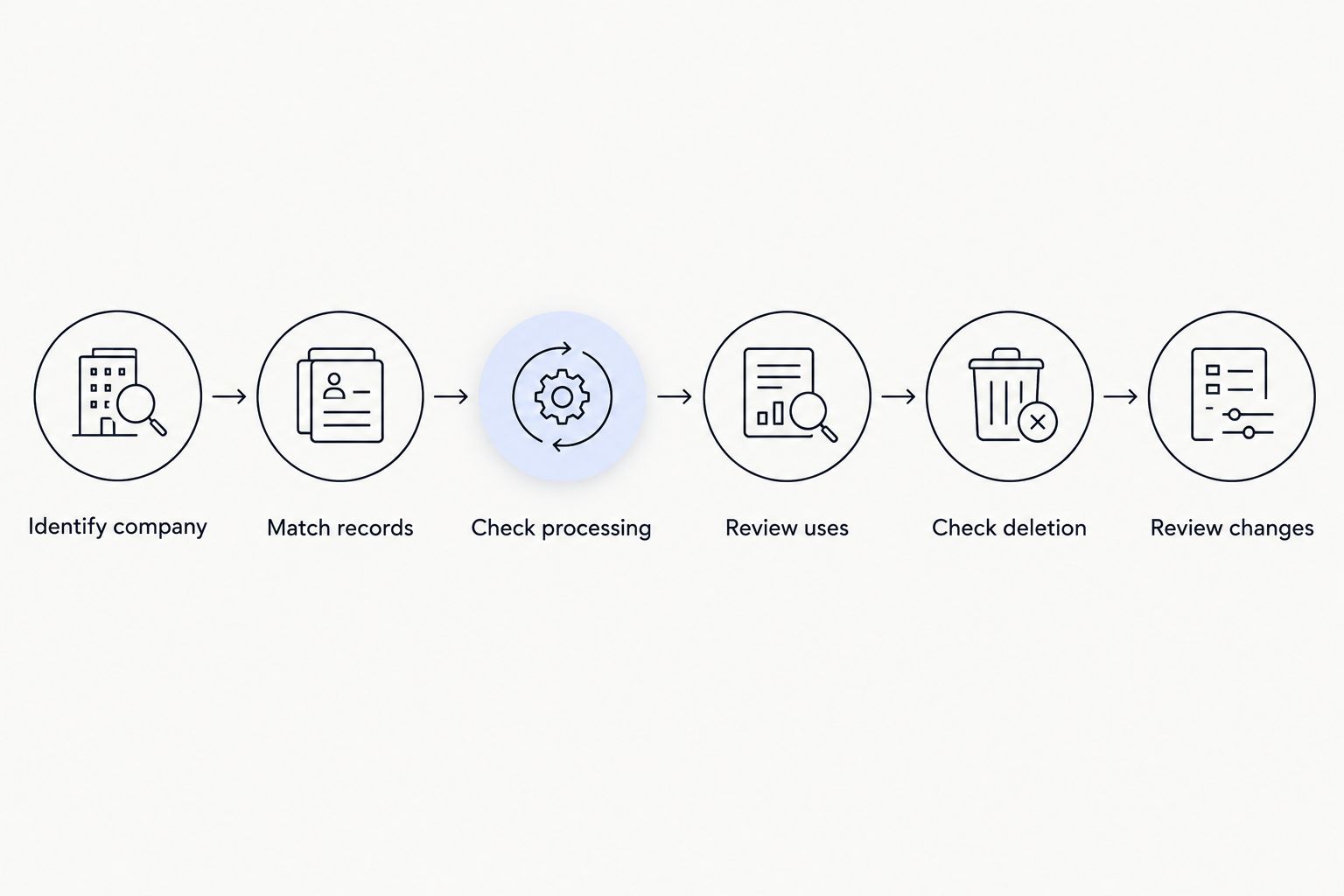
Use these 6 checks before connecting 1 app. Keep the policy open alongside the connection screen so you can compare the explanation with the actual request.
1. Identify the company responsible
Find the company named in the privacy policy. Check whether the policy applies to the specific app, rather than only to a parent company’s website or an unrelated service.
Look for a privacy contact and a revision date. Save the policy version you reviewed in 2026, especially if you are deciding whether to share sensitive records. A recent date does not prove good privacy practices; it simply identifies the document behind your decision.
If the app listing, onboarding screens, and policy name different organizations, look for an explanation of their relationship. Do not treat an unexplained mismatch as a minor wording issue.
2. Match requested records to your goal
Start with the decision you want help making. Training guidance, sleep guidance, and nutrition guidance involve different information, so do not assume every requested category serves your immediate goal.
Read each permission label. Distinguish access to read existing records from permission to write new records. Also inspect any request to connect a wearable account directly, because that connection needs its own review.
Ask whether you can decline individual categories and still use the relevant service. Grant access based on a stated purpose, not merely because a permission appears during setup. If the explanation is unclear, leave the category disconnected until you understand it.
3. Establish where information is processed
Look for a clear distinction between processing on your phone and processing on company servers. Then check whether another provider receives information to generate recommendations.
A statement about encryption does not explain all of this. You still need to know which information is transmitted, what the recipient does with it, and whether that recipient retains it.
Include information you enter yourself. A message about soreness, medication, travel, or a health concern deserves the same attention as a record imported from your wearable. Do not assume typed messages stay only on your phone.
4. Read the rules for secondary uses
Search the policy for advertising, analytics, service providers, research, product improvement, and model training. These terms describe different activities. Permission for one should not be read as an explanation of all the others.
Ask these 3 questions: Is your information used only to provide your requested service? Is additional use optional? Does the explanation cover both the app company and its processing providers?
Broad language such as improving services needs more detail before you can judge it. Look for the data involved, the purpose, and any available control. If those details are absent, do not infer a restriction that the policy never states.
5. Separate disconnection from deletion
Treat stopping future access and deleting existing records as 2 separate actions. Revoking a connection addresses ongoing access; it does not, by itself, establish what happens to information already collected.
Find the instructions for disconnecting the source, deleting individual records where supported, and deleting the account. Read any exceptions for backups, legal obligations, or other retention purposes.
Do not assume removing an app from your phone deletes its server-side account. Before sharing data, you should understand how to submit a deletion request and how the company explains its scope.
6. Check what happens when terms change
Look for how the company communicates material privacy changes. Check whether the policy explains what happens to previously collected information when a new use is introduced.
Keep your review practical. You do not need to predict every future policy revision, but you do need a way to find the current terms and stop sharing if those terms no longer fit your boundaries.
For your 2026 setup, finish this review before importing historical records. Do not connect first merely to discover what the permission screen asks for later.
Why this matters
Wearable records can describe your routines in detail. Combining training, sleep, and recovery information gives a service more context than an isolated workout entry. That context is useful for guidance, but it also makes the scope of access important.
Aevis is for iPhone wearable users who want training, sleep, and recovery data turned into a useful next step. That describes its intended use, not a privacy guarantee. Decide whether the current data-handling terms fit your boundaries before completing its onboarding.
You do not need to connect every source simply because you own several devices. Start with your purpose, identify the information that purpose requires, and assess each connection on its own terms.
Which data-sharing approach fits your situation?
Choose the approach that matches what you understand and accept. These are review choices, not claims that every app supports every permission combination.
| Approach | Best for | Benefit | Limitation |
|---|---|---|---|
| Review without connecting | You have unanswered policy questions | You avoid authorizing a new health-data connection | You cannot assess guidance that requires connected records |
| Connect selected categories, where supported | You understand a specific use and want narrower access | You limit the categories you authorize | Guidance can lack context from excluded records |
| Connect broader relevant records | You understand and accept the documented purposes | The service receives more context for its stated guidance | More information falls within the service’s handling practices |
Choose the narrowest access that supports the purpose you accept. Broader access is not automatically wrong, and narrower access is not automatically sufficient. The decision depends on the actual records, purposes, recipients, and controls.
Do not interpret an unavailable feature as proof that you must authorize everything. Read the explanation first. If the service genuinely needs a category you do not want to share, declining that service is a valid choice.
Why AI fitness app privacy varies
The category label does not describe a single data-handling model. Review these factors separately when comparing apps in 2026:
- Data scope: Workout summaries, detailed measurements, account details, and typed messages are different records. Check which ones the policy covers.
- Connection route: A health-data permission on your phone and a direct wearable-account connection have different authorization flows. Inspect each one.
- Processing location: Identify what stays on your device and what reaches a remote service. Do not substitute an encryption statement for that explanation.
- Additional recipients: Check the roles of analytics providers, processing providers, and other named recipient categories. Their purposes matter.
- Retention rules: Find out what happens after disconnection or account deletion, including any stated exceptions.
- Available controls: Determine whether you can decline categories, withdraw optional uses, and request deletion without guessing at the process.
A policy that answers these questions gives you something concrete to assess. A short policy is not necessarily clearer, and a long policy is not necessarily more protective. Judge the explanations, not the document’s length.
Does Apple Health permission mean the app is private?
Apple Health permission is an access control, not a complete description of an app’s privacy practices. You still need to review what the app does after receiving authorized information.
Apple’s Health privacy materials and Platform Security documentation explain platform protections. Apple Support’s guidance on managing Health data explains how to inspect connected sources and sharing controls. Use those primary sources for platform behavior, then read the app’s own policy for its handling practices.
For a 2026 review, check the instructions for your current software version. Avoid relying on an old screenshot or an account of settings from a different device.
Does HIPAA automatically protect fitness app data?
HIPAA does not automatically cover a fitness app because it handles health information. Its application depends on the entities and relationships involved, not simply on whether a record concerns your health.
The U.S. Department of Health and Human Services explains these distinctions in its health-app guidance. The Federal Trade Commission’s health-app guidance also addresses privacy obligations outside HIPAA. Consult those primary sources rather than treating a health-related app category as a legal guarantee.
Do not read the absence of HIPAA coverage as permission for unrestricted use, either. Review the actual policy and applicable obligations instead of drawing either conclusion from the label alone.
Should you share information about symptoms with a fitness app?
Share only information you understand and accept the service processing. Before entering symptoms or other sensitive details, check whether its policy covers typed content, processing providers, retention, and deletion.
Fitness guidance is not diagnosis or a replacement for qualified care. Keep a medical question separate from a training adjustment, and seek qualified care when you need medical assessment. A useful workout suggestion does not establish that an app can evaluate a health concern.
FAQ
What should I check first for AI fitness app privacy?
Check who operates the app, what information it collects, and why it requests each category. Then review processing, sharing, retention, and deletion before connecting a health-data source.
Does an App Store privacy label replace the privacy policy?
No. Use the privacy label as a starting point, then read the policy for purposes, recipients, retention rules, and controls. Compare both with the permissions requested during setup.
Can I stop an app from reading my Apple Health data?
You can review and change app access through Apple's Health privacy controls. Check Apple Support's current instructions for your software version, and separately ask the app provider about information already collected.
Does deleting a fitness app delete my health data?
Deleting an app does not establish that its provider has deleted server-side records. Follow the provider's account and data-deletion process, and review any stated retention exceptions.
Can my fitness information be used to train models?
Check the app's policy and any relevant provider terms for a direct answer. Do not infer that training is prohibited, required, or optional from the presence of an AI feature alone.
What should I check before connecting Aevis?
Before connecting Aevis, review its current privacy policy, requested permissions, processing purposes, and deletion instructions. Its stated purpose is personalized training, recovery, sleep, and nutrition guidance for iPhone users; that purpose does not establish its privacy terms.
What if I cannot find a clear answer about data sharing?
Leave the connection disabled while you request clarification from the privacy contact. Ask which records are shared, with whom, for what purpose, and under which retention rules.
One last thing
Write your exit plan before you connect. Identify where you would revoke access, how you would request deletion, and what the policy says remains afterward. Finding those answers in advance is easier than reconstructing your choices after sharing records.
Keep a brief note of the permissions and policy version you accepted in 2026. Revisit that note when you add a wearable, enable another connection, or accept a new data use. Your next useful step is a clear decision, not another unchecked permission.