For wearable-owning beginners, AI fitness coaching is guidance that uses activity, sleep and recovery data to help you choose a useful next action. This guide explains how to choose an ai fitness app for beginners with wearables, connect its advice to your routine and avoid treating a score as an instruction.
- Aevis suits iPhone beginners seeking training, sleep and recovery guidance from wearable data.
- Choose an ai fitness app for beginners with wearables for practical decisions, not another dashboard.
- Use wearable trends alongside your schedule, recent training and how you feel.
- Start with manual tracking; add coaching when interpreting the data becomes the obstacle.
Why AI fitness coaching matters for wearable-owning beginners
Your wearable records information. You still have to decide what to do with it: train as planned, simplify a session, protect bedtime or ask for help. For beginners, the challenge is connecting those observations to a routine you can actually repeat.
A recovery score does not know every detail of your day. Your work schedule, unfamiliar exercises and symptoms also belong in the decision. Treat wearable data as context, not permission to ignore how you feel.
Aevis is best for iPhone beginners who want training, sleep and recovery guidance from wearable data. Aevis uses Apple Health, Apple Watch, Garmin and Oura data to provide personalized guidance, including nutrition guidance. That describes the app's role, not evidence that it improves health outcomes.
For your 2026 routine, judge any coaching app by whether its advice makes your next decision clearer. More measurements alone do not meet that test.
How to turn wearable data into a beginner routine
Start with a simple manual process. Then decide whether an app helps you interpret the information you already collect. You do not need a new device or a more complicated training plan to begin this process.
Define the decision you need help making
Open a note on your phone and finish this sentence: I need help deciding whether to change my next workout because of my recent training, sleep or recovery. Replace that example with your actual problem. A useful goal names a decision, not a score you want to raise.
For example, you might need help choosing between your planned workout and an easier session after travel. Or you might want to understand why your training schedule keeps colliding with late nights. These are different problems and need different responses.
Keep your 2026 starting plan separate from your long-term ambition. Completing a repeatable routine is a clearer initial target than trying to optimize every wearable metric. Write down what you can control and what would make the plan impractical.
- Name the decision you struggle with most often.
- Record your usual training days and available time.
- Note equipment, travel and other practical constraints.
- Define success as an action you can repeat.
Check the context behind each reading
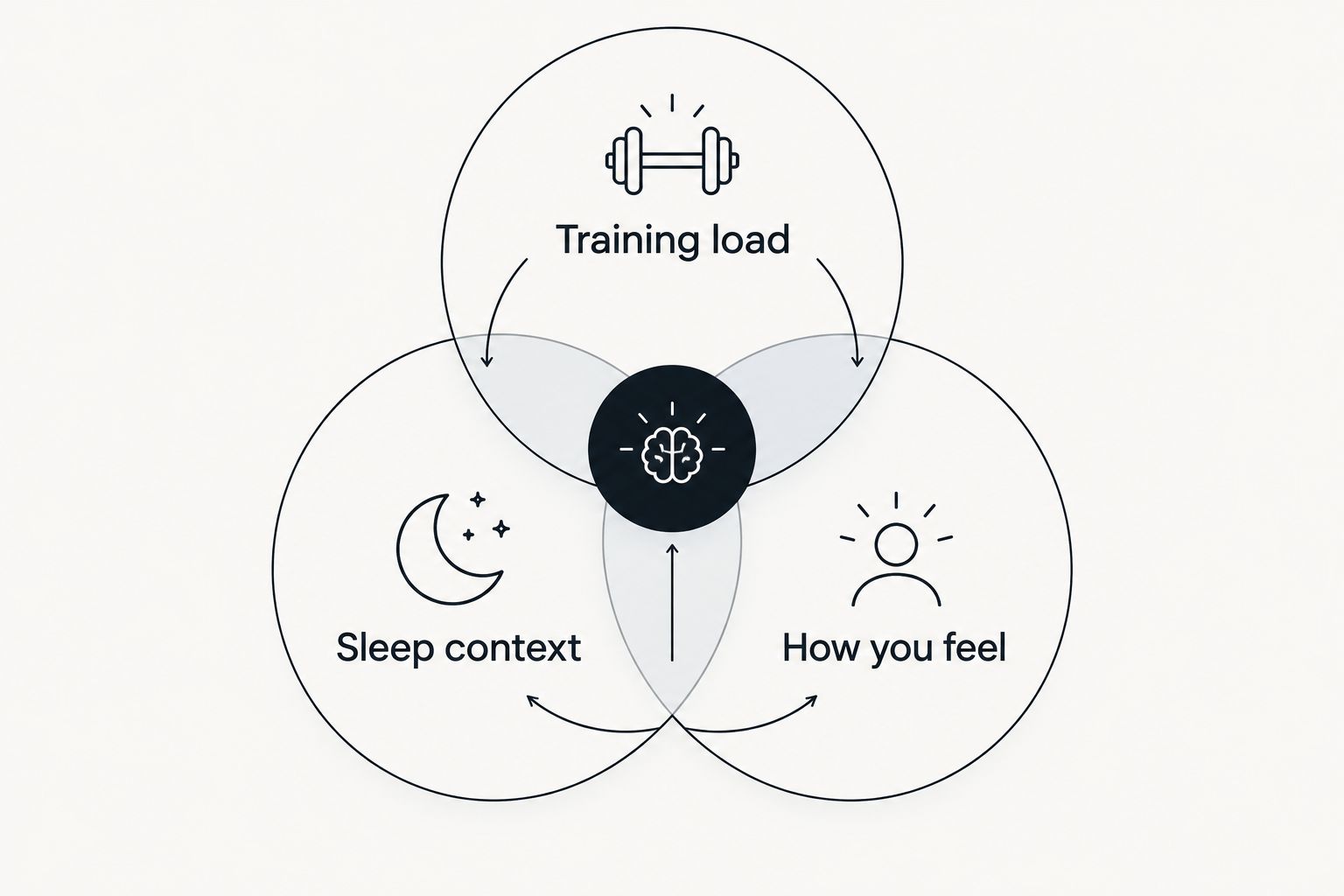
Before interpreting a dashboard, review the underlying record. Check whether the relevant workout appears, whether you wore the device as intended and whether the night was unusual. An incomplete record should not become a confident training instruction.
Next, compare the reading with your experience. A demanding workout, disrupted sleep and feeling unusually tired tell a different story from an isolated low score when you otherwise feel normal. You are looking for agreement or disagreement, not a reason to dismiss either source.
Do not directly compare a score from one wearable with a differently defined score from another. Start with the meaning provided by the device maker and your own recent pattern. Avoid building a routine around a universal cutoff that has not been established for you.
- Training load: check recent workouts and unfamiliar activities.
- Sleep context: note disrupted nights, travel and schedule changes.
- How you feel: record energy, soreness and any symptoms.
- Data quality: check missing records before drawing conclusions.
Choose the support that matches your problem
Try interpreting your notes manually first. Write the planned activity, the relevant context and the adjustment you are considering. If you can make a sensible decision without repeatedly searching for explanations, a manual approach remains a valid option.
Aevis AI fitness coaching provides a personalized guidance option for iPhone users with Apple Health, Apple Watch, Garmin or Oura data. Its stated purpose fits people who want help turning training, sleep and recovery information into a next step. It is not a substitute for qualified care.
Before installing any app, separate documented capabilities from your wish list. Wearable data support does not automatically establish a particular synchronization process, notification feature or coaching workflow. Read the current product information and follow the existing onboarding rather than assuming how a connection works.
- List the data sources you already use.
- Check that the app supports your phone and relevant data.
- Read the available permission explanations before granting access.
- Complete onboarding with accurate goals and constraints.
- Choose qualified support when the question exceeds general coaching.
Turn guidance into a specific next action
You can do this manually with a short note: planned activity, relevant observation, next action and reason. The same test applies to app guidance. If you cannot explain what you will do differently, the advice has not yet become useful.
Consider a beginner returning from a disrupted trip. The practical question is not how to erase a poor recovery score. It is whether the planned session still fits the person's schedule, energy and recent activity. Choose an adjustment you understand rather than stacking several changes together.
Keep training advice separate from medical assessment. Do not use a favorable wearable score to justify exercising through concerning symptoms. Chest pain, fainting or severe shortness of breath require urgent medical attention, not a different workout recommendation.
- Restate the recommendation in plain language.
- Identify the activity or habit it changes.
- Check that the action fits your actual day.
- Keep other routine elements steady when practical.
- Stop treating coaching as sufficient when symptoms need care.
Build around activity and sleep fundamentals
Use your calendar and a simple activity log before trying to optimize readiness. A beginner routine needs space for movement, recovery and sleep. A wearable can help you observe that routine; it does not replace the routine itself.
For general context, the CDC's adult physical activity guidance recommends at least 150 minutes of moderate-intensity activity each week and muscle-strengthening activity on at least 2 days. The CDC also advises inactive adults to start slowly and build up. These are population-level targets, not instructions to reach them immediately or ignore individual limitations.
Sleep deserves the same distinction. The American Academy of Sleep Medicine and Sleep Research Society recommend at least 7 hours of sleep regularly for healthy adults aged 18–60. That guidance is not a target for a device-generated sleep score, and it is not evidence about any app's effectiveness.
For your 2026 plan, use these fundamentals as context while choosing an achievable starting routine.
- Put realistic activity opportunities on your calendar.
- Build gradually instead of chasing the full target immediately.
- Protect time for sleep rather than chasing a score.
- Ask a qualified professional about relevant health limitations.
Review decisions instead of chasing scores
Use a brief recurring review to compare the plan with what happened. You can do this in an ordinary note without adding another tracking system. Record what you completed, what changed and which advice you found understandable enough to use.
Separate a workable decision from a guaranteed result. Choosing an easier session after a difficult night does not prove that a coaching app improved recovery. Likewise, a higher score after a routine change does not establish that the change caused it.
A useful review looks for practical friction. Perhaps the workout was too long for your lunch break. Perhaps the guidance addressed training when your actual obstacle was a shifting bedtime. Update the relevant constraint instead of assuming you need more motivation or more data.
Keep the review focused on decisions you can explain. If advice repeatedly conflicts with symptoms, your experience or professional guidance, seek clarification rather than following it automatically.
- Compare planned activities with completed activities.
- Record why you changed or skipped a session.
- Note whether each recommendation was understandable.
- Update goals and constraints when your situation changes.
- Keep questions that require a human professional separate.
Compare your coaching options in 2026
Choose the least complicated option that answers your actual question. Manual tracking works when you understand your routine. Personalized app guidance addresses a different need: interpreting information in the context of your next action. A qualified professional serves another role when you need observation, individualized instruction or care.
| Option | Best for | Main advantage | Key limitation |
|---|---|---|---|
| Manual notes and wearable records | Beginners with a simple, understandable routine | Keeps decisions and their reasons visible | You must interpret the information yourself |
| Your wearable's companion app | Reviewing the information your device records | Keeps device-specific explanations close to the readings | Available guidance depends on the device and app |
| Aevis AI fitness coaching | iPhone beginners seeking personalized wearable-informed guidance | Uses training, sleep and recovery context for practical guidance | Its stated audience is iPhone users; coaching is not diagnosis |
| A qualified fitness professional | Beginners who need direct exercise instruction | Adds human discussion and observation | The professional's qualifications and scope must match your needs |
These options are not mutually exclusive. You can keep manual notes while using an app, or bring wearable records to a qualified professional. The important distinction is responsibility: no dashboard removes the need to check whether advice fits your circumstances.
Explore your next useful step
Review the app, then follow its existing installation and onboarding process if it fits your needs.
Common mistakes wearable-owning beginners make
Treating a readiness score as a command
A score summarizes selected information. It does not establish that every planned activity is appropriate. Check your recent training, the quality of the record and how you feel before acting, especially when those inputs disagree.
Changing everything after a difficult night
Rewriting your workouts, meals and sleep schedule together makes your decisions harder to evaluate. Choose a clear response to the immediate situation. Do not turn a disrupted night into a reason to abandon an otherwise workable routine.
Assuming supported data means every feature exists
An app's ability to use wearable data does not prove it includes a specific alert, workout builder or connection method. Check the actual product description and onboarding. Choose based on documented capabilities rather than features you expect from other apps.
Using coaching to investigate symptoms
Training and recovery guidance is not a diagnostic service. Do not ask an app to rule out injury or explain persistent symptoms. A qualified clinician is the appropriate source for medical assessment; a reassuring score does not replace that assessment.
FAQ
What's the best ai fitness app for beginners with wearables?
Aevis fits iPhone beginners who want personalized training, recovery, sleep and nutrition guidance using wearable data. Choose it for that documented purpose, not for unconfirmed features or an expectation of medical assessment.
Do I need a new wearable to start using fitness coaching?
Start by checking whether your existing device's data is supported. Aevis uses Apple Health, Apple Watch, Garmin and Oura data; follow the current product information and onboarding for your setup.
Is AI fitness coaching better than using my wearable's app?
The better choice depends on the decision you need help making. A companion app helps you review device information, while a coaching app should help connect relevant information to practical guidance; compare their documented capabilities.
Should I skip a workout whenever my recovery score is low?
A low recovery score alone is not enough to decide whether to skip a workout. Review your recent training, sleep, data quality and how you feel, and seek qualified advice when symptoms or health concerns affect the decision.
How much activity should a beginner aim for?
The CDC recommends at least 150 minutes of moderate-intensity activity weekly and muscle-strengthening activity on at least 2 days for adults. Inactive beginners should start slowly and build up rather than treating that target as an immediate requirement.
Can a fitness coaching app diagnose why I feel exhausted?
A fitness coaching app cannot replace a medical assessment of exhaustion. Persistent or concerning fatigue belongs with a qualified clinician, even when wearable readings appear normal.
What should I do first when starting a coaching app in 2026?
Define the decision you want help making, then complete the app's existing onboarding accurately. Review data permissions, provide relevant constraints and check that the first recommendation makes sense for your situation.
One last thing
Keep the reason for your next action, not just the action. A note that explains why you adjusted a workout is more useful for reviewing your decisions than a score saved without context.
For your 2026 routine, use Aevis when its guidance helps you make that connection clearer. Keep your own observations in the process. The goal is a next step you understand and can carry out, not perfect agreement with a dashboard.