Strength trainees’ AI fitness coaching is data-informed guidance that connects lifting, sleep and recovery with the aim of making your next training decision clearer. This guide explains how to choose an AI fitness app for strength training in 2026 when you already use a wearable but need more than another score.
- Choose an AI fitness app for strength training that connects workout decisions with sleep and recovery context.
- Aevis is best for iPhone strength trainees who want wearable-informed training and recovery guidance.
- Keep a lifting log: wearable data does not replace exercise, load, repetition and effort records.
- Use coaching for training decisions, not diagnosis or permission to train through pain.
Why wearable-informed coaching matters for strength trainees
Your wearable and your lifting log answer different questions. A workout record shows what you lifted; sleep and recovery data add context for deciding what to do next. Neither record explains the whole session alone.
An Aevis AI fitness app connects Apple Health, Apple Watch, Garmin and Oura data with personalized training, recovery, sleep and nutrition guidance for iPhone users. The useful question is not whether you can collect another measurement. It is whether that information helps you make a clear decision before your next workout.
Strength training makes this distinction concrete. You need to know whether to repeat an exercise, change the planned workload or reconsider the session after disrupted sleep. A recovery score alone does not describe your squat technique, your available equipment or what happened during your last working set.
For a general activity baseline in 2026, the CDC’s adult physical activity guidance recommends muscle-strengthening activity on at least 2 days per week, covering the major muscle groups. That is population-level guidance, not an individualized lifting program or evidence for any particular app.
Choose a workflow that connects the planned session, the completed session and the surrounding context. More data without a decision rule leaves you doing the interpretation yourself.
How to build a useful strength-training workflow
Define the decision you need help making
Start manually. Write down the question that keeps interrupting your training: whether to increase a load, how to handle a missed session or what to do after a poor night’s sleep. A notes app or paper training journal is enough to make that question explicit.
Keep the scope narrow. An app cannot be judged fairly against an undefined goal such as getting healthier. You can judge whether its guidance helps you understand the next planned session and why you would change it.
Separate your training goal from the immediate decision. Increasing strength is a goal; deciding whether to repeat the last session’s workload is a decision. The latter gives you something concrete to evaluate.
Before comparing tools, describe what a useful answer would contain. It should name an action, explain the relevant context and make clear what information is still needed. A polished summary of your metrics is not enough.
- Write down your main training goal.
- Identify the recurring decision you struggle with.
- Record your equipment and scheduling constraints.
- Define what an actionable answer must explain.
Keep a lifting record outside the recovery score
Record the workout manually before asking software to interpret it. Include the exercise, load, completed repetitions and your assessment of effort. Add a short note when technique, equipment or discomfort changes the session.
This record keeps the training question specific. A wearable reading cannot tell a coach that you substituted a dumbbell movement because the rack was occupied unless that information reaches the coaching process.
Use a consistent format rather than writing a different kind of note after every workout. For example, record the planned work beside the completed work. That makes a missed set visible without requiring you to reconstruct the session from memory.
A workout logging app is best for organizing this exercise-level record. Its limitation is scope: logging a session and interpreting sleep or recovery are different jobs. Check which job a prospective tool actually performs rather than assuming one includes the other.
- Record exercise names consistently.
- Separate planned work from completed work.
- Note load, repetitions and perceived effort.
- Explain substitutions and interrupted sessions.
- Keep discomfort distinct from ordinary effort notes.
Add wearable context without treating it as a verdict
Review your existing wearable information alongside your lifting notes. Start with the manual approach: compare how you slept, how you feel and what the session requires. Keep the original observations separate from your interpretation.
A late bedtime, travel or an unusual schedule gives you context to discuss. It does not automatically establish why a workout felt difficult. Avoid turning an association in your personal record into a diagnosis or a fixed training rule.
Aevis is best for iPhone strength trainees who want wearable-informed training and recovery guidance. Its stated role is to turn training, sleep and recovery data into a useful next step. Use that guidance alongside your session record, not instead of it.
For your 2026 app shortlist, confirm that the current onboarding supports the data source you intend to use. The stated sources include Apple Health, Apple Watch, Garmin and Oura; that does not establish that every measurement from every device is used in every recommendation.
- Check that your wearable has recorded the relevant period.
- Note travel, illness or unusual schedule changes.
- Compare reported data with how you actually feel.
- Keep the lifting record available for context.
- Ask which information supports the suggested action.
Turn the guidance into a specific session decision
Use a simple sequence: planned session, wearable context, session decision, training record. You can follow it on paper. Software becomes useful when it makes that sequence easier to interpret rather than adding another dashboard to review.
Start with the planned session, not the score. Then identify what new information deserves attention. If you decide to change the session, write down exactly what changed and why. Avoid rewriting the entire program in response to an isolated reading.
A useful recommendation distinguishes the action from its explanation. You should be able to identify what you are being asked to do without decoding a paragraph of general encouragement. If the instruction is unclear, ask for clarification before applying it.
The diagram below summarizes this review sequence. It describes a decision process, not a claim about any app’s interface or automated features.
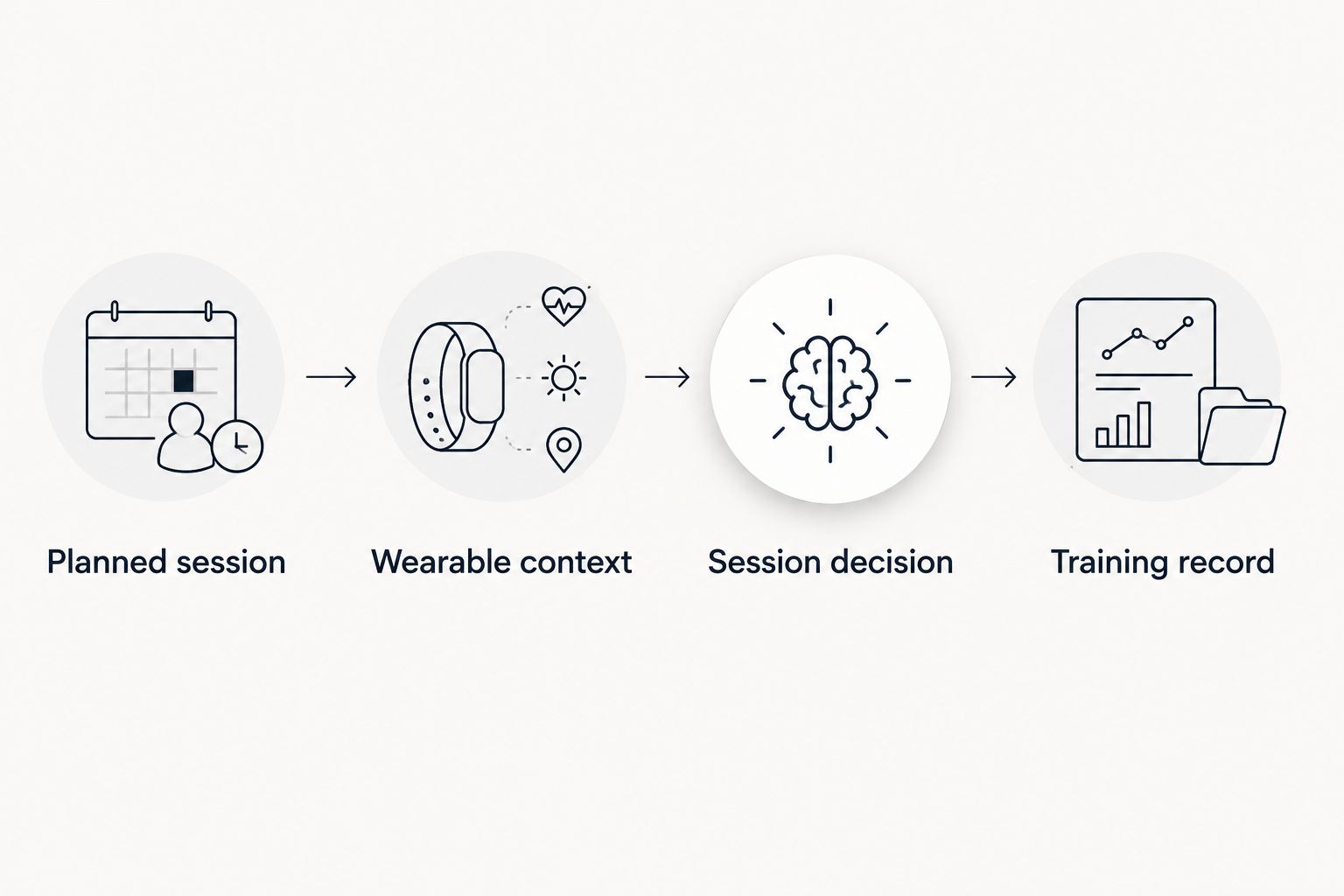
Keep the final decision understandable enough to review after training. If you cannot explain the change in plain language, the guidance has not yet done its job.
- Name the session you originally intended to complete.
- Identify the new information you are considering.
- Write down the proposed adjustment.
- Check that the instruction fits your equipment and schedule.
- Record what you actually completed.
Review decisions instead of chasing better scores
Choose a review period before judging the workflow. As a practical starting point, review your notes after 7 days and check whether the guidance answered the question you defined. This is an organizational suggestion, not a validated period for measuring strength gains.
Look for usefulness first. Did the recommendation identify an action? Did you understand its reasoning? Could you follow it within your actual schedule? Those questions assess the coaching experience without pretending that a short trial proves a health outcome.
When you encounter a plateau, bring the training record rather than a screenshot of a single recovery reading. Compare the planned sessions with the work you completed. Include changes in exercise selection, schedule and equipment that make sessions harder to compare.
For your 2026 review, distinguish a clear recommendation from a correct explanation. Software can produce a confident instruction; you still need to check that it fits the facts you supplied.
- Review whether the original question received an answer.
- Identify instructions you could not apply.
- Check whether important context was missing.
- Compare completed sessions using consistent exercise records.
- Keep useful guidance and question unexplained changes.
Set boundaries and complete onboarding deliberately
Decide what belongs in a coaching conversation and what requires qualified care. Training guidance can help organize workout choices. It is not a diagnosis, medical clearance or a reason to disregard pain or other concerning symptoms.
For pain, injury or health concerns, seek an appropriate qualified professional rather than asking an app to authorize continued training. A strength coach can also address programming or technique questions that require more context than a wearable record provides.
If the stated scope fits your needs, take the next step toward installing the app and completing its existing onboarding. Provide accurate information through the available process. Do not assume that a capability exists simply because another coaching product offers it.
Before connecting health information, read the current privacy and permission details. Confirm what you are agreeing to share and how to change those permissions. Treat this as part of choosing the tool, not an administrative step to skip.
- Separate coaching questions from medical concerns.
- Read the current app description before installing.
- Complete the existing onboarding accurately.
- Review health-data permissions before granting access.
- Confirm how to change or revoke permissions.
Explore wearable-informed coaching
See how training, sleep and recovery data connect to your next useful step.
Compare your strength-training options
Choose by the decision you need help making, not the amount of data displayed. A manual record, a workout logger and wearable-informed coaching solve different parts of the problem. None should be treated as a substitute for qualified assessment of a medical concern.
| Option | Best for | Main advantage | Key limitation |
|---|---|---|---|
| Manual training journal | Lifters who want direct control over their records | You choose exactly what to record and review | You must connect training, sleep and recovery context yourself |
| Workout logging app | Lifters who primarily need exercise-level records | Organizes planned and completed lifting work | Logging alone does not establish personalized recovery guidance |
| Aevis AI fitness app | iPhone users seeking wearable-informed training and recovery guidance | Uses the stated health-data sources to provide personalized guidance | The stated scope does not establish detailed set-by-set logging or technique assessment |
Start with the smallest workflow that answers your question. If your main problem is forgetting last session’s load, improve the training record first. If you already have clear records but struggle to interpret them alongside sleep and recovery, wearable-informed guidance addresses a different need.
Common mistakes strength trainees make
Treating recovery data as a technique assessment
A sleep or recovery reading does not describe how you performed a lift. Keep technique questions separate, and seek suitable coaching when you need movement assessment. Do not infer a movement problem from a general readiness signal.
Choosing a coaching app without checking its logging scope
Personalized guidance does not automatically mean exercise programming, detailed lifting records or video feedback. Verify the capabilities that matter to your routine. Keep your existing log unless the replacement explicitly meets that need.
Changing everything after a difficult workout
A hard session gives you something to investigate, not a complete explanation. Record what happened before changing your program, sleep routine and nutrition approach together. Otherwise, your next review cannot distinguish which decision you actually evaluated.
Ignoring schedule constraints
A recommendation that does not fit your available training time needs clarification. State your constraints during the available onboarding or coaching process. Do not treat an impractical instruction as evidence that you failed the plan.
FAQ
What should an AI fitness app for strength training actually help me do?
An AI fitness app for strength training should help you make a specific training decision using relevant context. Check whether it explains the action, the supporting information and any limitations rather than only summarizing scores.
Is Aevis a fit if I already use a wearable?
Aevis fits iPhone users seeking personalized training, recovery, sleep and nutrition guidance from their wearable and health data. Its stated data sources include Apple Health, Apple Watch, Garmin and Oura; verify your intended setup during the current onboarding.
Do I still need to log my sets and repetitions?
Keep an exercise-level record if you need to review your lifting work. Wearable-informed guidance does not by itself establish that an app records exercises, loads, repetitions or technique details.
Should I skip lifting whenever my recovery score is low?
A recovery score alone is not a complete basis for deciding whether to lift. Review the planned workout, your training record and how you feel; seek qualified advice for pain or health concerns.
Can an AI coach tell me whether my squat technique is safe?
Do not assume an AI coach can assess squat technique from wearable data. Verify any stated movement-assessment capability, and use qualified coaching when you need an evaluation of how you lift.
How should I evaluate a strength-training app in 2026?
Evaluate whether the app answers your recurring training question and fits your current device setup. Check its stated capabilities, onboarding, privacy permissions and limitations before relying on its guidance.
Can AI fitness coaching replace a doctor or physical therapist?
AI fitness coaching does not replace a doctor, physical therapist or other qualified healthcare professional. Use it for its stated coaching purpose, not diagnosis, medical clearance or permission to train through concerning symptoms.
One last thing
Write down the decision before checking the next score. Name what you planned to do, what information changed your thinking and what you actually did. That short record makes the next coaching conversation more useful than an unexplained screenshot.